 pevans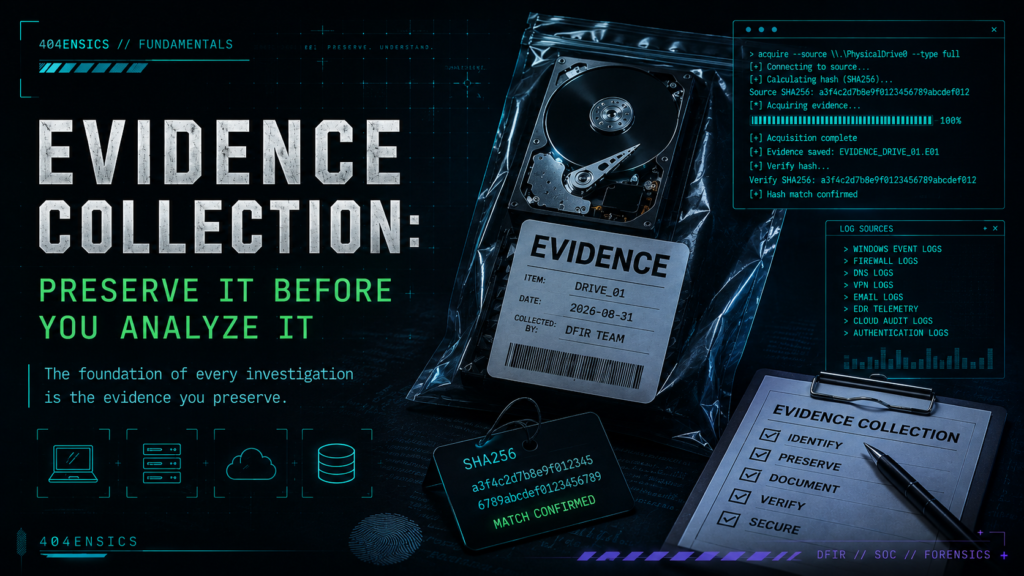
Once an incident has been scoped and containment is underway, the next challenge is collecting the evidence needed to understand what happened. Good evidence collection is about more than copying files, it is about preserving the right data, from the right systems, at the right time.
In digital forensics and incident response (DFIR), once you have started to understand the scope of an incident and containment efforts are underway, you need evidence. Without good evidence, everything that comes later becomes more difficult.
Evidence collection is the process of identifying and preserving the data that may help explain what happened, when it happened, how it happened, and what occurred while an attacker had access to the environment.
This could mean collecting a full disk image from a compromised workstation, capturing memory from a running server, exporting event logs, preserving firewall logs, collecting email records, acquiring cloud audit logs, or making a forensic copy of a suspicious file.
The important part is that collection should have a purpose. Do not collect something simply because you can. You should have an idea of what question that evidence may help answer.
What Are You Trying to Prove?
Before collecting evidence, ask yourself what you are trying to learn from it.
If a user account was compromised, authentication logs may help determine when and where the account was accessed. If malware executed on a workstation, memory, Windows Event Logs, filesystem artifacts, browser history, EDR telemetry, and a forensic image may all provide different pieces of the investigation.
If you suspect data was stolen, your collection may need to expand to firewall logs, proxy logs, DNS records, VPN activity, cloud storage, email logs, and the systems where the potentially stolen information was stored.
This is where your earlier scoping work becomes important. Scoping should help identify which systems, accounts, and data sources are most likely to contain useful evidence.
Start With the Most Volatile Evidence
Not all evidence sticks around.
Some evidence may remain on a hard drive for months or years. Other evidence can disappear the moment a system is powered off, a user logs out, a process terminates, or a log rolls over.
This is why responders need to think about the volatility of the evidence they are collecting.
A running system may contain active network connections, logged-on users, running processes, encryption material, command history, malware that exists only in memory, and other information that may not survive a shutdown.
If you immediately power that system off because you want to preserve the hard drive, you may preserve one source of evidence while destroying another.
Leaving a compromised system running also carries risk. Malware may continue executing, an attacker may still have access, files may be modified, or evidence may be destroyed.
There is no single answer that applies to every situation. Incident response is often a balancing act between preserving evidence and preventing additional damage.
What Should You Collect?
The evidence you collect will depend on the incident, but several common sources should be considered during an investigation.
- System memory (RAM)
- Full or targeted disk images
- Windows Event Logs
- Linux and macOS system logs
- EDR and antivirus telemetry
- Authentication and identity-provider logs
- Firewall, VPN, proxy, and DNS logs
- Email and mail-security logs
- Browser history and related browser artifacts
- Cloud audit and authentication logs
- Network packet captures when available
- Suspicious files and malware samples
- Registry and operating-system artifacts
- Application and database logs
This does not mean you need all of these for every investigation. Collecting everything from everywhere can quickly create more data than your team can reasonably process.
Focus first on evidence relevant to your current scope, then expand collection as new information develops.
Full Disk vs. Targeted Collection
One decision you will frequently make is whether to acquire an entire disk or collect only specific forensic artifacts.
A full forensic image gives you a broad view of the system. It may contain deleted files, filesystem metadata, user data, operating system artifacts, application data, and evidence that you do not yet know you need.
The downside is time and storage. Imaging large servers or dozens of endpoints can take a significant amount of time and create terabytes of data that someone eventually has to process.
Targeted collection takes a different approach. Instead of acquiring everything, you collect specific artifacts known to have investigative value.
On a Windows endpoint, for example, you might collect Event Logs, Registry hives, the Master File Table (MFT), Prefetch, Amcache, browser artifacts, LNK files, Jump Lists, scheduled tasks, and other relevant artifacts without acquiring the entire drive.
Collect From More Than the Endpoint
One mistake investigators can make is focusing entirely on the compromised computer.
The endpoint is only one piece of the investigation.
Imagine you are investigating a compromised user account. The user’s laptop may provide useful evidence, but the identity provider may show authentication from an unusual IP address. VPN logs may show how that account interacted with the environment. Email logs may reveal the phishing message that started the attack. Firewall logs may identify connections to attacker infrastructure. Cloud audit logs may show files being accessed or downloaded.
None of those pieces individually tell the entire story.
Together, they may allow you to reconstruct it.
Preserve the Original Evidence
Once evidence has been collected, protect it.
Whenever practical, analysis should be performed against a working copy rather than the original evidence. If something goes wrong during analysis, you want the ability to return to the original collection.
This becomes especially important when evidence may eventually be used for legal, regulatory, disciplinary, or other formal purposes.
Cryptographic hashing is commonly used to help demonstrate that collected data has remained unchanged. A hash produces a repeatable value based on the contents of the data; if those contents change, the resulting hash should also change.
For forensic evidence, a modern algorithm such as SHA-256 is recommended. You may still encounter MD5 and SHA-1 in forensic tools and legacy workflows, but both have known collision weaknesses and should not be relied upon when stronger algorithms are available. This does not automatically make evidence hashed with MD5 or SHA-1 invalid or inadmissible. However, their known weaknesses can create an unnecessary challenge to the integrity/verification method. Using SHA-256, and documenting the hash at acquisition and verification, provides a stronger and more defensible approach.
At a minimum, record what was collected, where it came from, when it was collected, who collected it, what tool was used, and any hash values generated during the process.
Documentation Matters
Documentation is not the exciting part of an investigation, but it becomes extremely important later.
During a fast-moving incident, it is easy to believe you will remember exactly where a file came from or why a particular system was collected.
A week later, after examining twenty systems and thousands of artifacts, that confidence disappears quickly.
Keep notes as you work.
Useful collection notes may include:
- Hostname or system identifier
- User associated with the system
- IP and MAC addresses when relevant
- Date and time of collection
- Relevant time zone
- Evidence collected
- Collection method
- Tool and tool version
- Hash values
- Where the evidence is stored
- Errors or unusual conditions encountered
Your notes do not need to be complicated. They need to be accurate enough that you or someone else can understand what you did later.
Don’t Wait for Collection to Finish
Just like scoping, evidence collection does not need to be a completely linear process.
If you have multiple responders, work in parallel.
While one person is acquiring a forensic image from a compromised server, another responder might collect firewall and VPN logs. Someone else can review EDR telemetry while another analyst begins examining artifacts already collected from the initial endpoint.
If that analysis identifies another compromised account or system, feed that information back into the scoping and collection process.
An investigation is rarely a straight line from step one to step two to step three. New evidence should cause you to pivot when there is a reason to do so.
Avoid Collecting Yourself Into a Corner
More evidence is not always better evidence.
If you indiscriminately collect every endpoint, every log source, and every available disk image, you can create an enormous backlog before meaningful analysis even begins.
Imagine an environment with 2,000 endpoints. Acquiring a 500 GB forensic image from every endpoint could potentially create a petabyte of data before accounting for processing overhead, working copies, backups, or network transfer.
In most incidents, that would make very little sense.
Instead, use what you learned during scoping to prioritize systems. Start with known or highly suspected compromised systems, important infrastructure, affected user accounts, and systems that may contain evidence related to attacker movement.
As your understanding improves, expand collection where the evidence supports it.
Collection Can Change the Evidence
One final concept to understand is that interacting with a live system changes it.
Running a collection tool creates processes. Commands can alter system state. Files may be created. Network connections may occur. Memory changes continuously while the operating system is running.
This does not mean live collection is bad. In many incidents it is necessary.
It means you should understand that your actions have an impact and document what you did.
The goal is not to pretend that no change occurred. The goal is to minimize unnecessary changes, understand the changes you introduced, and be able to explain them.
Conclusion
Evidence collection is where much of the later investigation is won or lost. If important evidence is missed, overwritten, or destroyed, no analysis tool can magically bring all of it back.
Start with the scope of the incident. Identify the questions you are trying to answer. Prioritize volatile and time-sensitive evidence, collect from multiple sources, preserve the originals, verify what you collected, and document your actions.
Most importantly, do not treat collection as a checkbox that must be completed before analysis begins. DFIR is iterative. What you learn during analysis should influence what you collect next, and what you collect should continue to refine your understanding of the incident.
Once the evidence is preserved, the next step is figuring out what it is telling you.